

M.I.T. Consulting - IT Consulting and Cybersecurity Services in Toronto
About M.I.T. Consulting - IT Consulting and Cybersecurity Services in Toronto
M.I.T. Consulting – IT Consulting and Cybersecurity Services in Toronto is a consulting services provider based in Toronto. Services include IT Consulting, Managed IT Services, Cybersecurity, ERP / Systems Consulting. Website-listed areas of focus include Cloud Services. Service format information: In-person / physical location.
Reviews
Loading Google Maps reviews...
Amenities
Payment
Frequently Asked Questions
01What happens during onboarding and transition?
Onboarding begins with a structured review of your current environment to identify gaps, risks, and priorities. Systems are documented, standardized, and brought under active management with minimal disruption. The transition is designed to stabilize operations quickly while laying the groundwork for long-term improvement. Throughout the process, communication and planning ensure a smooth handover and clear expectations moving forward.
02How does managed IT improve security and compliance?
4% of small business owners rank cybersecurity as their top risk, yet unmanaged security gaps remain one of the biggest threats to operations and compliance. Managed IT embeds security and compliance directly into everyday IT management rather than treating them as one-off projects. This includes continuous risk management, policy alignment, system hardening, and guidance around evolving regulatory requirements. By making security part of how systems are built and maintained, organizations reduce exposure, improve audit readiness, and operate with greater confidence as standards and threats continue to change.
03Is managed IT only for small businesses?
Managed IT is well suited for small and growing organizations, but it also supports larger teams through co-managed and advisory models. Businesses with internal IT staff often use managed IT to fill skill gaps, strengthen security, or gain access to senior-level guidance. The service adapts to your size, complexity, and internal capabilities rather than forcing a one-size-fits-all model.
04How is managed IT different from break-fix support?
Break-fix support reacts after something goes wrong, often leading to downtime, disruption, and unpredictable costs. Managed IT is proactive by design. Systems are continuously monitored, maintained, and improved to prevent issues before they impact operations. This approach reduces risk, improves reliability, and creates a more predictable IT experience that supports long-term planning rather than short-term fixes.
05What does managed IT services include?
Managed IT services provide end-to-end oversight of your technology environment. This includes day-to-day support, system monitoring, security management, cloud and software administration, backups, and strategic guidance. Instead of reacting to issues, managed IT focuses on prevention, stability, and alignment with your business objectives. The goal is to give you a fully supported IT foundation without needing to build or maintain an internal IT department.
06What happens during onboarding and transition?
Onboarding begins with a structured review of your current environment to identify gaps, risks, and priorities. Systems are documented, standardized, and brought under active management with minimal disruption. The transition is designed to stabilize operations quickly while laying the groundwork for long-term improvement. Throughout the process, communication and planning ensure a smooth handover and clear expectations moving forward.
07How does managed IT improve security and compliance?
4% of small business owners rank cybersecurity as their top risk, yet unmanaged security gaps remain one of the biggest threats to operations and compliance. Managed IT embeds security and compliance directly into everyday IT management rather than treating them as one-off projects. This includes continuous risk management, policy alignment, system hardening, and guidance around evolving regulatory requirements. By making security part of how systems are built and maintained, organizations reduce exposure, improve audit readiness, and operate with greater confidence as standards and threats continue to change.
08Is managed IT only for small businesses?
Managed IT is well suited for small and growing organizations, but it also supports larger teams through co-managed and advisory models. Businesses with internal IT staff often use managed IT to fill skill gaps, strengthen security, or gain access to senior-level guidance. The service adapts to your size, complexity, and internal capabilities rather than forcing a one-size-fits-all model.
09How is managed IT different from break-fix support?
Break-fix support reacts after something goes wrong, often leading to downtime, disruption, and unpredictable costs. Managed IT is proactive by design. Systems are continuously monitored, maintained, and improved to prevent issues before they impact operations. This approach reduces risk, improves reliability, and creates a more predictable IT experience that supports long-term planning rather than short-term fixes.
10What does managed IT services include?
Managed IT services provide end-to-end oversight of your technology environment. This includes day-to-day support, system monitoring, security management, cloud and software administration, backups, and strategic guidance. Instead of reacting to issues, managed IT focuses on prevention, stability, and alignment with your business objectives. The goal is to give you a fully supported IT foundation without needing to build or maintain an internal IT department.
11What happens during onboarding and transition?
Onboarding begins with a structured review of your current environment to identify gaps, risks, and priorities. Systems are documented, standardized, and brought under active management with minimal disruption. The transition is designed to stabilize operations quickly while laying the groundwork for long-term improvement. Throughout the process, communication and planning ensure a smooth handover and clear expectations moving forward.
12How does managed IT improve security and compliance?
4% of small business owners rank cybersecurity as their top risk, yet unmanaged security gaps remain one of the biggest threats to operations and compliance. Managed IT embeds security and compliance directly into everyday IT management rather than treating them as one-off projects. This includes continuous risk management, policy alignment, system hardening, and guidance around evolving regulatory requirements. By making security part of how systems are built and maintained, organizations reduce exposure, improve audit readiness, and operate with greater confidence as standards and threats continue to change.
13Is managed IT only for small businesses?
Managed IT is well suited for small and growing organizations, but it also supports larger teams through co-managed and advisory models. Businesses with internal IT staff often use managed IT to fill skill gaps, strengthen security, or gain access to senior-level guidance. The service adapts to your size, complexity, and internal capabilities rather than forcing a one-size-fits-all model.
14How is managed IT different from break-fix support?
Break-fix support reacts after something goes wrong, often leading to downtime, disruption, and unpredictable costs. Managed IT is proactive by design. Systems are continuously monitored, maintained, and improved to prevent issues before they impact operations. This approach reduces risk, improves reliability, and creates a more predictable IT experience that supports long-term planning rather than short-term fixes.
15What does managed IT services include?
Managed IT services provide end-to-end oversight of your technology environment. This includes day-to-day support, system monitoring, security management, cloud and software administration, backups, and strategic guidance. Instead of reacting to issues, managed IT focuses on prevention, stability, and alignment with your business objectives. The goal is to give you a fully supported IT foundation without needing to build or maintain an internal IT department.
16What happens during onboarding and transition?
Onboarding begins with a structured review of your current environment to identify gaps, risks, and priorities. Systems are documented, standardized, and brought under active management with minimal disruption. The transition is designed to stabilize operations quickly while laying the groundwork for long-term improvement. Throughout the process, communication and planning ensure a smooth handover and clear expectations moving forward.
17How does managed IT improve security and compliance?
4% of small business owners rank cybersecurity as their top risk, yet unmanaged security gaps remain one of the biggest threats to operations and compliance. Managed IT embeds security and compliance directly into everyday IT management rather than treating them as one-off projects. This includes continuous risk management, policy alignment, system hardening, and guidance around evolving regulatory requirements. By making security part of how systems are built and maintained, organizations reduce exposure, improve audit readiness, and operate with greater confidence as standards and threats continue to change.
18Is managed IT only for small businesses?
Managed IT is well suited for small and growing organizations, but it also supports larger teams through co-managed and advisory models. Businesses with internal IT staff often use managed IT to fill skill gaps, strengthen security, or gain access to senior-level guidance. The service adapts to your size, complexity, and internal capabilities rather than forcing a one-size-fits-all model.
19How is managed IT different from break-fix support?
Break-fix support reacts after something goes wrong, often leading to downtime, disruption, and unpredictable costs. Managed IT is proactive by design. Systems are continuously monitored, maintained, and improved to prevent issues before they impact operations. This approach reduces risk, improves reliability, and creates a more predictable IT experience that supports long-term planning rather than short-term fixes.
20What does managed IT services include?
Managed IT services provide end-to-end oversight of your technology environment. This includes day-to-day support, system monitoring, security management, cloud and software administration, backups, and strategic guidance. Instead of reacting to issues, managed IT focuses on prevention, stability, and alignment with your business objectives. The goal is to give you a fully supported IT foundation without needing to build or maintain an internal IT department.
21What happens during onboarding and transition?
Onboarding begins with a structured review of your current environment to identify gaps, risks, and priorities. Systems are documented, standardized, and brought under active management with minimal disruption. The transition is designed to stabilize operations quickly while laying the groundwork for long-term improvement. Throughout the process, communication and planning ensure a smooth handover and clear expectations moving forward.
22How does managed IT improve security and compliance?
4% of small business owners rank cybersecurity as their top risk, yet unmanaged security gaps remain one of the biggest threats to operations and compliance. Managed IT embeds security and compliance directly into everyday IT management rather than treating them as one-off projects. This includes continuous risk management, policy alignment, system hardening, and guidance around evolving regulatory requirements. By making security part of how systems are built and maintained, organizations reduce exposure, improve audit readiness, and operate with greater confidence as standards and threats continue to change.
23Is managed IT only for small businesses?
Managed IT is well suited for small and growing organizations, but it also supports larger teams through co-managed and advisory models. Businesses with internal IT staff often use managed IT to fill skill gaps, strengthen security, or gain access to senior-level guidance. The service adapts to your size, complexity, and internal capabilities rather than forcing a one-size-fits-all model.
24How is managed IT different from break-fix support?
Break-fix support reacts after something goes wrong, often leading to downtime, disruption, and unpredictable costs. Managed IT is proactive by design. Systems are continuously monitored, maintained, and improved to prevent issues before they impact operations. This approach reduces risk, improves reliability, and creates a more predictable IT experience that supports long-term planning rather than short-term fixes.
25What does managed IT services include?
Managed IT services provide end-to-end oversight of your technology environment. This includes day-to-day support, system monitoring, security management, cloud and software administration, backups, and strategic guidance. Instead of reacting to issues, managed IT focuses on prevention, stability, and alignment with your business objectives. The goal is to give you a fully supported IT foundation without needing to build or maintain an internal IT department.
26What happens during onboarding and transition?
Onboarding begins with a structured review of your current environment to identify gaps, risks, and priorities. Systems are documented, standardized, and brought under active management with minimal disruption. The transition is designed to stabilize operations quickly while laying the groundwork for long-term improvement. Throughout the process, communication and planning ensure a smooth handover and clear expectations moving forward.
27How does managed IT improve security and compliance?
4% of small business owners rank cybersecurity as their top risk, yet unmanaged security gaps remain one of the biggest threats to operations and compliance. Managed IT embeds security and compliance directly into everyday IT management rather than treating them as one-off projects. This includes continuous risk management, policy alignment, system hardening, and guidance around evolving regulatory requirements. By making security part of how systems are built and maintained, organizations reduce exposure, improve audit readiness, and operate with greater confidence as standards and threats continue to change.
28Is managed IT only for small businesses?
Managed IT is well suited for small and growing organizations, but it also supports larger teams through co-managed and advisory models. Businesses with internal IT staff often use managed IT to fill skill gaps, strengthen security, or gain access to senior-level guidance. The service adapts to your size, complexity, and internal capabilities rather than forcing a one-size-fits-all model.
29How is managed IT different from break-fix support?
Break-fix support reacts after something goes wrong, often leading to downtime, disruption, and unpredictable costs. Managed IT is proactive by design. Systems are continuously monitored, maintained, and improved to prevent issues before they impact operations. This approach reduces risk, improves reliability, and creates a more predictable IT experience that supports long-term planning rather than short-term fixes.
30What does managed IT services include?
Managed IT services provide end-to-end oversight of your technology environment. This includes day-to-day support, system monitoring, security management, cloud and software administration, backups, and strategic guidance. Instead of reacting to issues, managed IT focuses on prevention, stability, and alignment with your business objectives. The goal is to give you a fully supported IT foundation without needing to build or maintain an internal IT department.
31Where is M.I.T. Consulting – IT Consulting and Cybersecurity Services in Toronto located?
M.I.T. Consulting – IT Consulting and Cybersecurity Services in Toronto is at 835 Supertest Rd #104, North York, ON M3J 2M9, Canada.
32What is the phone number for M.I.T. Consulting – IT Consulting and Cybersecurity Services in Toronto?
You can reach M.I.T. Consulting – IT Consulting and Cybersecurity Services in Toronto on (647) 496-6179.
33What are the opening hours?
Monday 00:00-23:59; Tuesday 00:00-23:59; Wednesday 00:00-23:59; Thursday 00:00-23:59; Friday 00:00-23:59; Saturday 00:00-23:59; Sunday 00:00-23:59.
34Does M.I.T. Consulting – IT Consulting and Cybersecurity Services in Toronto have a website?
Yes. Their website is https://mitconsulting.ca/managed-it-services-toronto/.
35Is M.I.T. Consulting – IT Consulting and Cybersecurity Services in Toronto on social media?
Yes - on Facebook, Instagram, LinkedIn and YouTube. The links are on this listing.
36What languages are spoken at M.I.T. Consulting – IT Consulting and Cybersecurity Services in Toronto?
Staff speak Bengali and English.
37Is M.I.T. Consulting – IT Consulting and Cybersecurity Services in Toronto wheelchair accessible?
Google lists accessible parking at this location.
Similar Listings
View all ›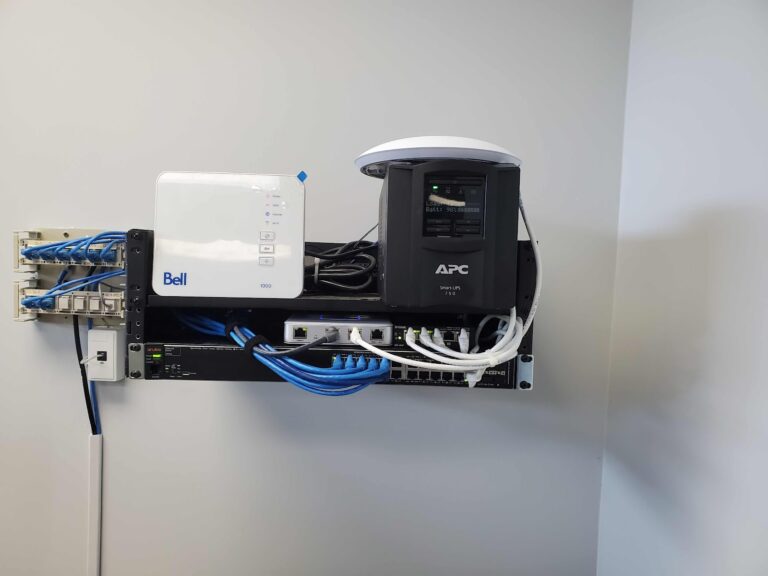



M.I.T. Consulting - IT Consulting and Cybersecurity Services in Toronto
835 Supertest Rd #104, North York, ON M3J 2M9, Canada, North York
- 1Create your accountA claim transfers this listing to you, so it has to be attached to a real account.
- 2Tell us who you areYour role at the business and how you are connected to it.
- 3Attach your proofUpload a PDF, JPG or PNG — a licence, utility bill or letterhead works well.